Scan ranked option contracts, narrow by ticker, side or expiry, then inspect the activity behind each result. Keep the chain, catalysts and your research notes close by.
No card needed for free access. Eligible accounts can try Founder Beta or Pro free for 5 days, then $29/mo or $49/mo.
From scanner to exact contractSynthetic example
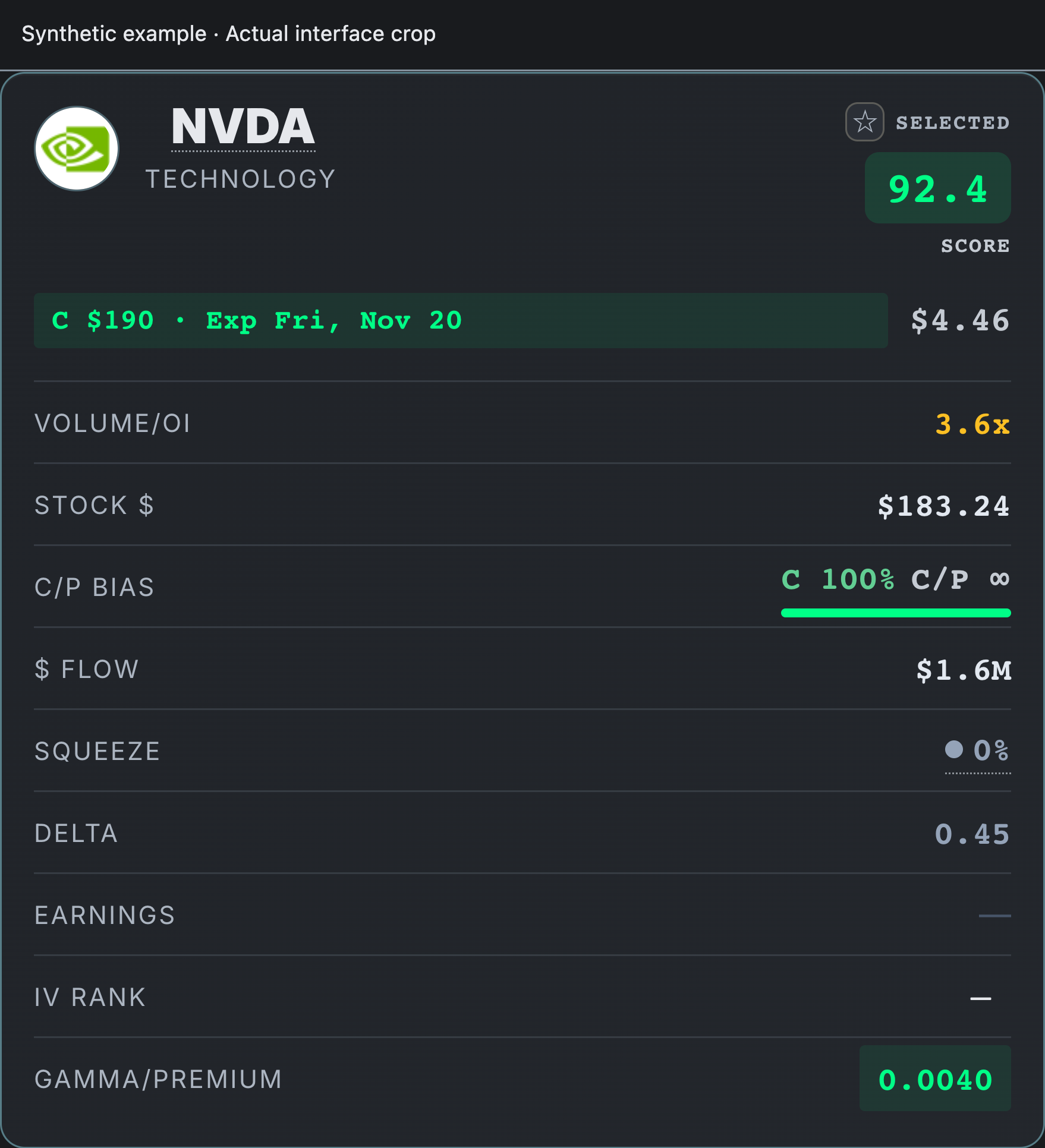
Inspect full contract ↗Read the contract, then the activity. Volume/OI compares traded contracts with open interest. $ Flow estimates premium traded; neither predicts a return.
Contract first Strike, expiry & sideContext close by Chains & catalystsA repeatable process Save, track & review
Inside the workspace
Know what to check next.
Focused details from the current interface. Enlarge any example to explore the full view.
01 / Inspect · Founder & Pro
Compare the contracts around your idea.
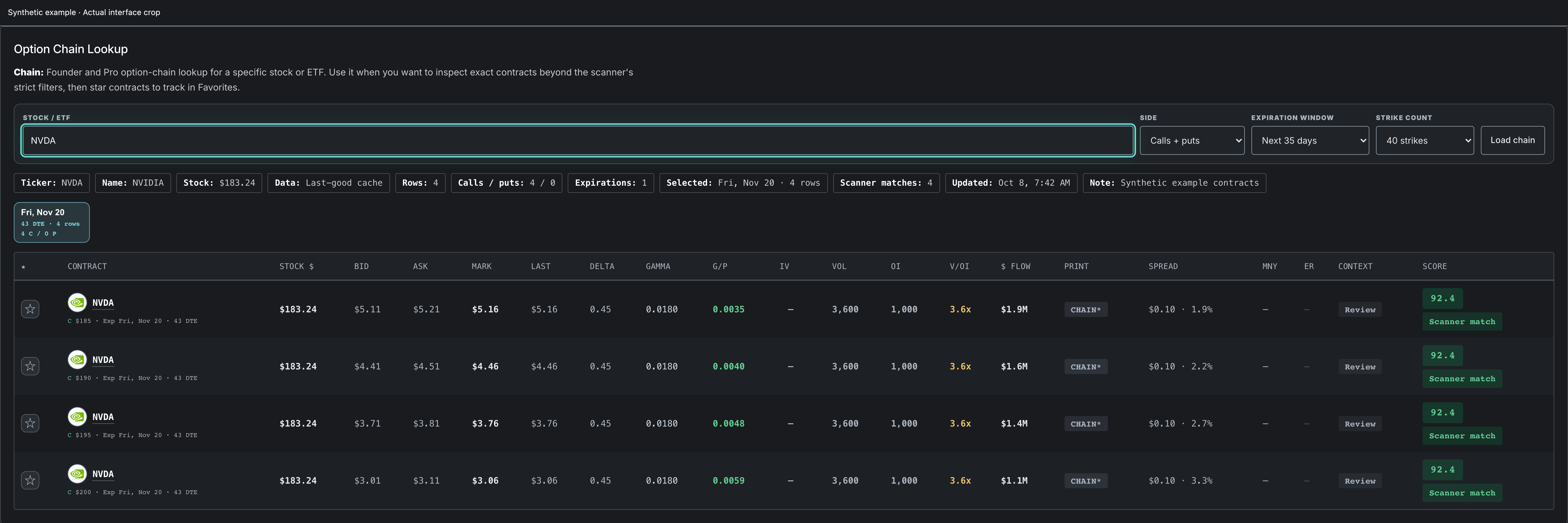
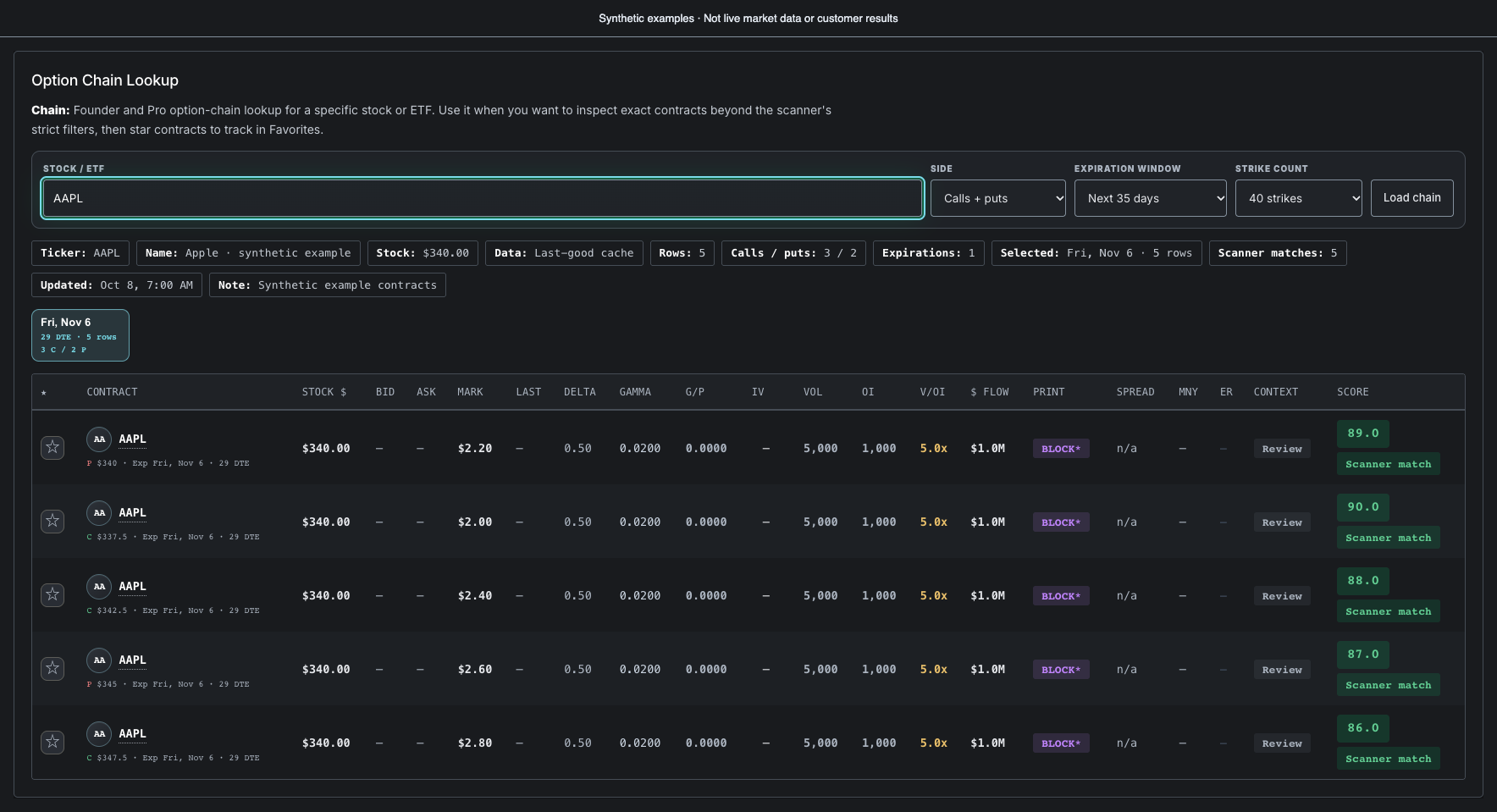
Look up a stock or ETF, choose an expiration, and compare strikes in the option chain.
Check the quote: bid, ask and mark sit beside the exact contract.
Check the activity: volume, open interest and premium add context to the quote.
Keep a shortlist: star a contract to follow it in Favorites.
These are screenshots of the actual interface, not interactive controls. All contract values, dates and notes are synthetic examples, not live market data or customer records. Options activity is one research input, not a recommendation.
Know what you are reading
Useful signals. Clear limits.
Options activity is one research input. The context and the limitations belong in the same view.
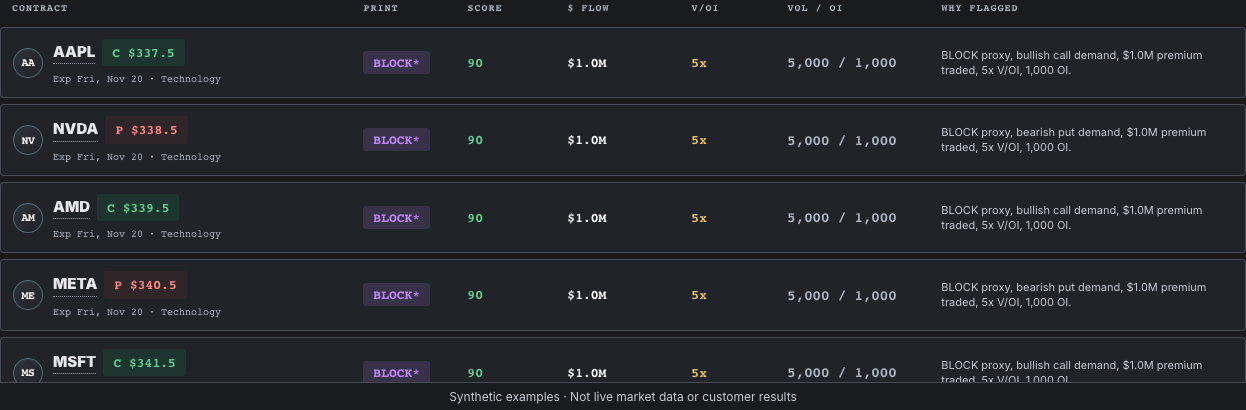
Review volume relative to open interest, premium traded, contract details and available quotes.
Add company context
Bring earnings, news, regulatory filings and analyst target changes into your review.
Understand the limits
Print typing is a chain-derived proxy. ConvexRadar has no licensed consolidated options tape or dark-pool feed. Cached data is identified in the product.
Paid plans renew at the listed monthly price after the trial. Cancel before the trial ends to avoid the first subscription charge.
Before you begin
A few useful answers.
Who is ConvexRadar for?
Options traders who want a repeatable way to inspect contract activity, research catalysts and review their own decisions. It is research software, not financial advice.
Can I try it without a subscription?
Yes. The free tier shows the top five ranked scan rows with full fields on those contracts. Founder Beta and Pro offer a 5-day free trial for eligible accounts. View plan details.
Are these screenshots live market data?
No. They show the actual product interface using synthetic example data. The examples do not represent recommendations, customer results or current market conditions.
Does options flow predict what happens next?
No. Chain activity can guide further research, but does not establish a trader’s intent or guarantee a price move. Review liquidity, timing, catalysts and your own risk limits.
Your next research session
Start with a clearer view.
Open the scanner. Follow the context. Make your own call.
Your free account includes up to five ranked scan rows with full fields. Founder Beta adds more ranked rows and option chain research.
Free access
Five ranked contracts. Every field.
Your free account shows up to five ranked scan rows, with full contract fields and research context on each visible row. No card needed. Add a paid plan when you need more rows or more tools.
Five rows, full detail
FREE
Review the first five ranked contracts available in the scan. Visible rows keep their prices, metrics, and reasoning.
Exact strike, expiry, and contract priceVolume, open interest, and GreeksScore context and risk flags
Ticker education
FREE
Free users can learn why volume/open interest, IV rank, gamma, delta, earnings, and news catalysts matter before paying.
Definitions for scanner metricsBasic earnings and news contextOptions setup checklist at the bottom of the page
Premium scanner
UPGRADE
Founder Beta expands the shortlist and adds option chain research. Your free rows already include full fields.
Full contract table and advanced filtersFiling, target, and news enrichmentManual refresh, charts, and alert roadmap
Unlock the complete ConvexRadar workflow
Founder Beta adds the broader scanner workflow. Pro adds advanced tools and the P/L journal. Eligible accounts can choose a 5-day trial at checkout; creating a free account does not start a trial.
What stays free
Market contextUp to five ranked rows from the available scan, with every field intact and the scan timestamp visible.
Signal educationPlain-English explanations for IV rank, V/OI, squeeze, gamma per premium, earnings risk, and catalysts.
No card neededKeep using the free view. You choose whether to explore a paid plan; account creation does not start a paid trial.
DATA Features Coming Soon
Founder Beta included / in testing
FavoritesIn testing
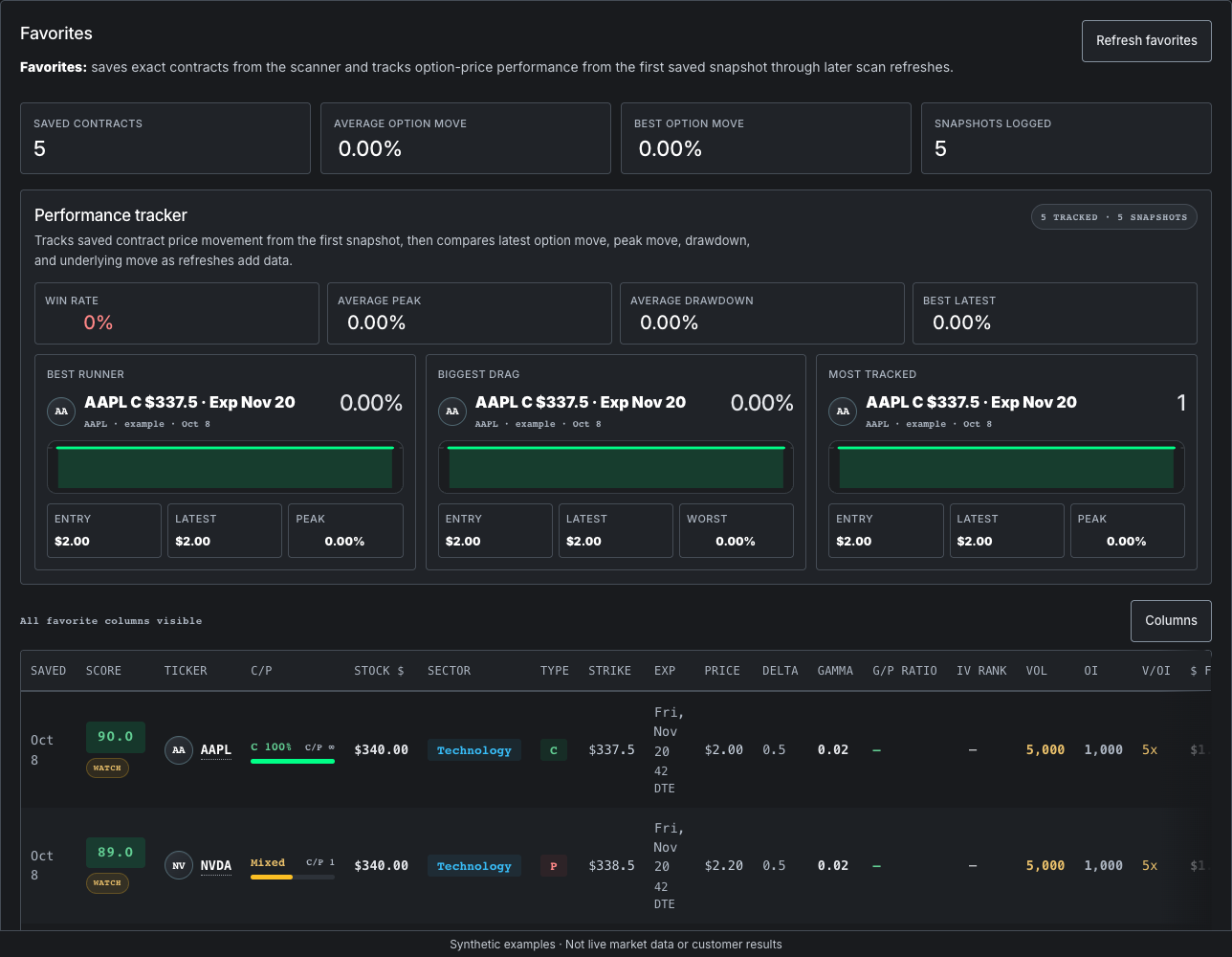
Save contracts and track how option price, underlying price, volume, OI, and score change after capture.
Options ChainsIn testing
Search a ticker and review calls, puts, expirations, strikes, and scanner context inside the site.
Signal Performance HistoryIn testing
Measure scanner hits against later returns, drawdowns, IV changes, and repeat unusual-flow behavior.
Higher Ticker CountIncrease the number of US stocks and ETFs scanned as the backend cache and data budget scale.
Private rooms for Pro members to share ticker ideas, contracts, strategy notes, and risk checks.
Social HeatPlanned
Public ticker chatter and attention tracking is planned. It is not a currently available Pro feature.
Repeat Flow DetectorIn testing
Find tickers where unusual options activity keeps repeating instead of appearing once.
Smart AlertsIn testing
Test signal thresholds privately before alert delivery is expanded.
P/L JournalIn testing
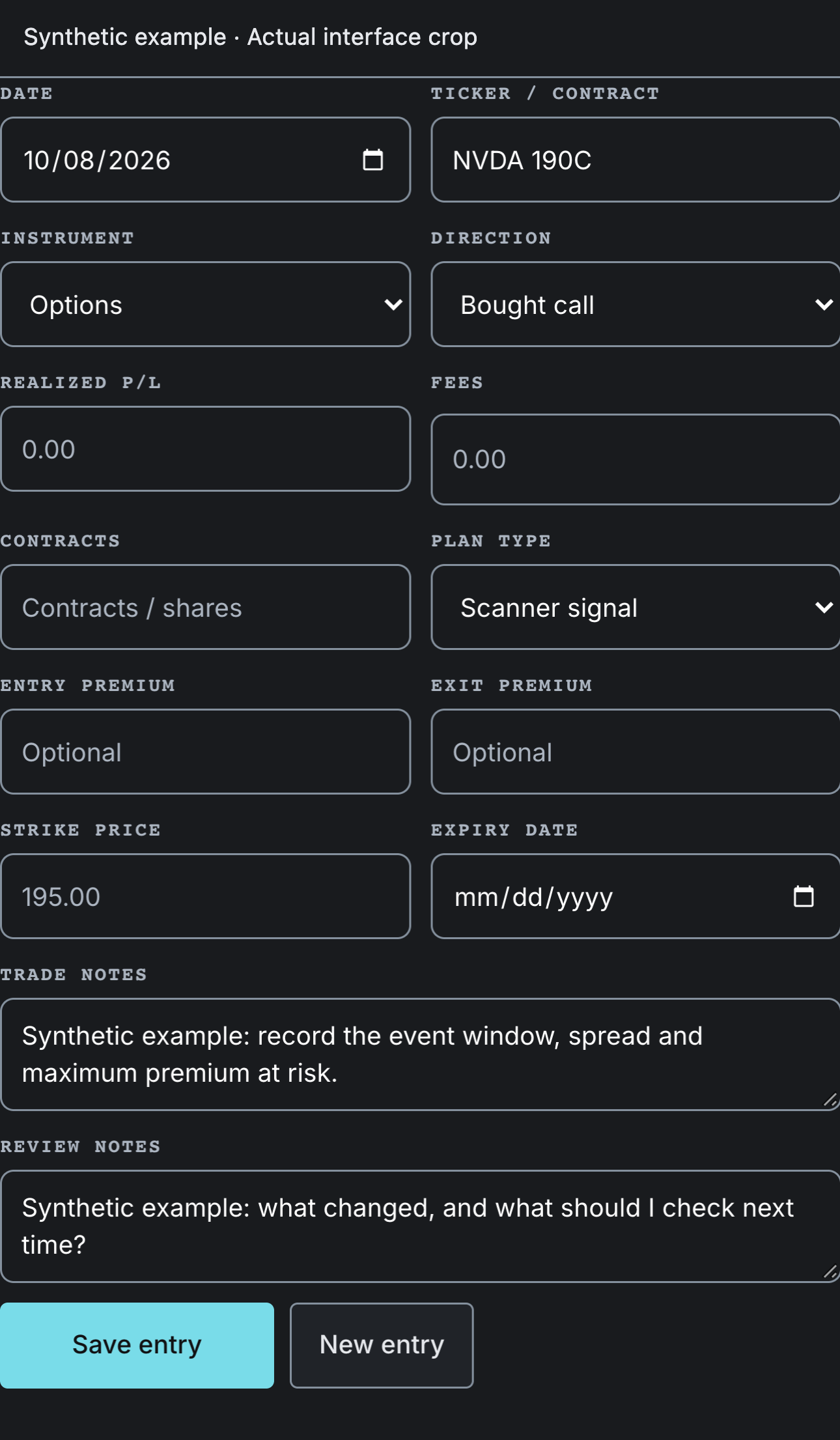
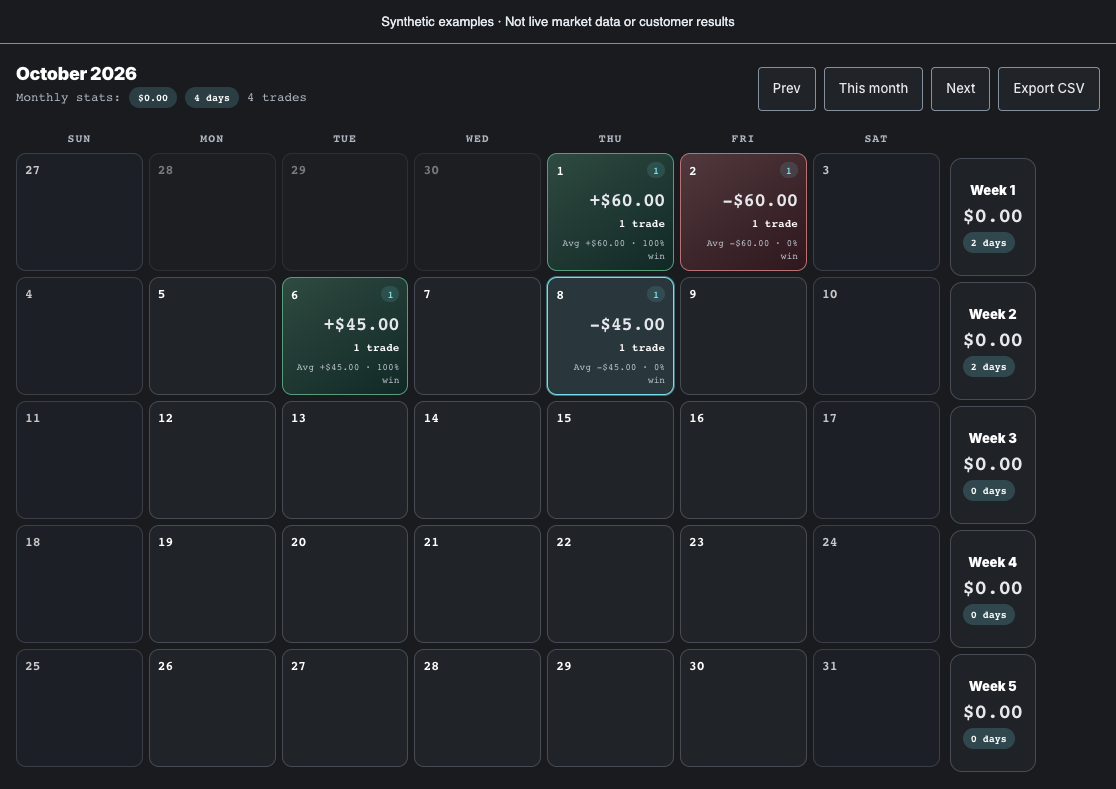
Record P/L by date, add trade notes, and review how each month is developing.
Options Income TrackerLog sold and bought contracts with strike, expiry and premium; realized premium counts only once a position resolves.
Options scanner
A ranked view of contract pressure, volatility, and context.
—
Waiting for scanner rows.
Latest news
Loading market headlines…
Research candidates Top five · inspect contracts
Research candidates◉ 3 SQUEEZES: NVDA, META, AMZN⚡ 4 unusual flow
Top cards pausedNo top-card setup currently clears every guardrail.
The table still shows matching contracts. Header cards require either clean low-IV convexity or extreme-flow conviction with minimum dollar flow, liquidity, and directional C/P bias.
Top 5
Contract explorer
Select a row to inspect →
8IV rank ↑
All scanner columns visible
SideExpiryUniverse
Advanced filtersNo extra filters active
★
Score
Stock $
Ticker
C/P
Sector
Type
Strike
Exp
Price
Delta
Gamma
G/P Ratio
Stored IV ↑
Vol
OI
V/OI
$ Flow
Print
Earnings
Spread
Squeeze
Loading matching contracts…
Showing rows
Signal context
Daily breakout radar50/200 golden & death crossLoading daily setups...Stages: Fresh = 50/200 cross within the last 5 sessions · Pending = averages within 2.5% and converging (no cross yet) · Established = cross within 45 sessions with price still confirming. Cards order fresh → pending → established, then by score.
A confluence radar, not a prediction. It flags where price presses into a daily supply/demand level against the prevailing trend, with RSI extremes/divergence, daily MACD, and reversal candlesticks lining up — the more that align, the higher the stage. Each card shows a target, invalidation, and reward:risk, because that asymmetry (not signal accuracy) is what the evidence says actually matters. Always confirm on your own chart and manage risk. Stages: Watch → Warning → Confirmed.
Scans a broad, rotating universe of liquid optionable stocks (not just mega-caps) for heavy volume in long-dated options (180–1095 days). Ranked by volume relative to open interest, so unusual positioning in lesser-watched names rises above the giants. Heavy LEAPS call volume can signal conviction that a stock does well over time — but it is one input, not proof. The universe is swept in slices through the session, so coverage builds over the trading day.
Sign in to load the LEAPS volume radar.
⚡ Options Flow — Blocks & Sweeps
Flow: summarizes contracts with the strongest option-chain pressure, split by bullish and bearish demand, using chain-derived block/sweep proxies and estimated premium dollars.
Bullish Flow
7
Bearish Flow
3
SWEEPNVDAC $950
320 contracts$134,400BULLISH
BLOCKTSLAC $290
500 contracts$142,500BULLISH
SWEEPAAPLP $235
250 contracts$47,500BEARISH
Inst Institutional Flow Proxy
Inst Flow: ranks the largest and cleanest option prints the available data can see. The available data does not identify the institution behind a trade, so this section looks for size, liquidity, and unusual chain activity instead.
Institution-attributed tape is not included; this ranks large option-chain prints using accessible data.Loading proxy rows
Loading institutional proxy signals...
⊞ Setup summary
Setup summary: up to 10 matching option contracts ranked by scanner score. Gamma/$ premium is gamma divided by the option price. Scores are research inputs on a 0–100 scale, not probabilities or measured price gaps.
Loading scanner setups…
8-K Regulatory Filings
Regulatory filings: shows fresh public regulatory filings for the active stock universe. No filings data key is required; the app uses public filing submissions and archive links with request caching and ETF noise filtered out.
8-K
Current report for material events shareholders should know about, such as leadership changes, deals, guidance, financing, legal events, or major corporate updates.
Form 4
Insider ownership change filed by directors, officers, or 10% owners. Watch for open-market buys/sells, option exercises, and repeated insider activity.
13F
Quarterly holdings report from large institutional investment managers. Useful for delayed fund-positioning context, crowding, and major position changes.
13D/G
Beneficial ownership reports. These can matter when a large holder, activist, or passive owner crosses reporting thresholds or changes a meaningful position.
S-1/S-3
Registration statements for new securities or shelf offerings. For public names, these can imply dilution or financing pressure and often matter more for puts.
424B
Prospectus or offering supplement. Useful for spotting finalized offering terms, convertibles, debt, shares, warrants, or other financing details.
10-Q
Quarterly report with unaudited financials, management discussion, and risk updates. Useful for checking whether fundamentals support the options setup.
10-K
Annual report with audited financials, business overview, risk factors, and full-year management discussion. Best for deeper fundamental and risk context.
Source: loading regulatory filingsLatest high-signal filings by active stock ticker
Loading regulatory catalyst filings...
Calendar
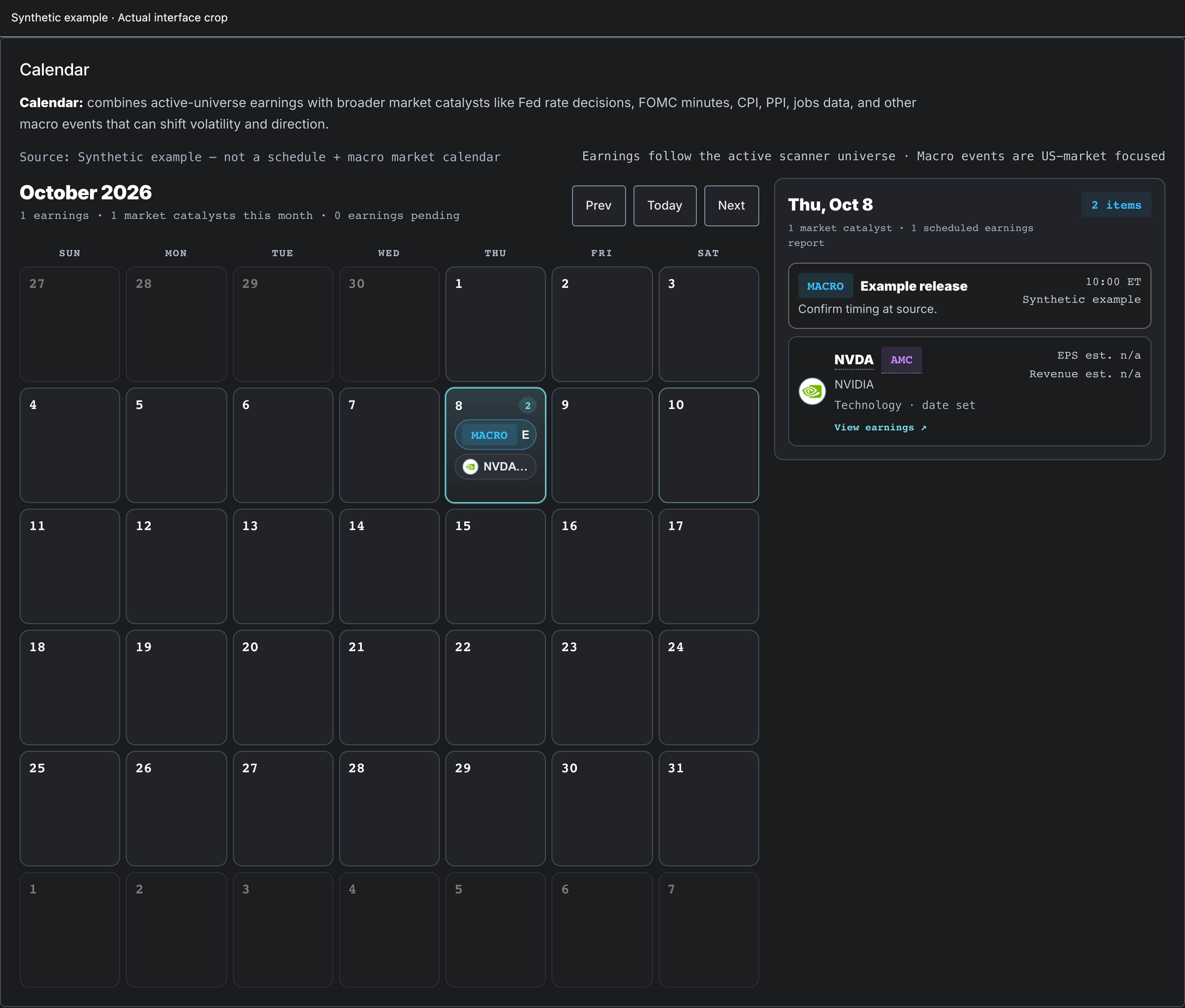
Calendar: combines active-universe earnings with broader market catalysts like Fed rate decisions, FOMC minutes, CPI, PPI, jobs data, and other macro events that can shift volatility and direction.
Source: loading earnings and market calendarEarnings follow the active scanner universe · Macro events are US-market focused
Loading calendar
Loading earnings dates...
Sun
Mon
Tue
Wed
Thu
Fri
Sat
PT Analyst Target Changes
Targets: tracks analyst price-target raises, cuts, upgrades, downgrades, and initiations from free news-derived sources. These updates can become directional catalysts when they line up with unusual flow.
Source: loading analyst-target updatesTarget raises, cuts, upgrades, downgrades, and initiations
Showing all target updates.
Loading analyst target updates...
📰 Live News Feed
News: headline feed for tickers in the active scan. It helps explain whether a contract-pressure spike has a current catalyst behind it.
Source: News feedHeadlines follow the current scan leaders
Loading headlines...
Support: send bug reports, feature requests, or questions about your account and data. Your signed-in account and page context are included to help reproduce the issue.
◎ Signal Track Record
Track Record: what the scanner ranked highest, graded against what those exact contracts did next. Returns cover only contracts matched to a usable later snapshot. Missing and expired-without-quote outcomes are counted as unknown; the matched subset can be biased. A record of whether the ranking was informative, not a claim about trading profit.
▤ Which conditions performed
Forward returns split by the conditions present when the contract was flagged. Thin samples are noise — check the n.
≡ Graded flags
Individual outcomes, winners and losers alike.
Contract
Flagged
Entry
Exit
Return
Not loaded yet.
🏛 Congress Trades
Congress Trades: STOCK Act periodic transaction reports from both chambers — Senate EFD and House Clerk filings. Members disclose a dollar range, not an exact size, and the law allows up to 45 days between the trade and the filing, so every row here is a historical position rather than a live trade. Research context, not advice.
Loading disclosed congressional trades…
◎ Whale Map
Whale Map: one ticker's price history with smart-money footprints pinned on the same timeline — disclosed congressional trades and open-interest surges (contracts opened and held overnight) from ConvexRadar's own retained chain history. Filings lag trades by up to 45 days; open-interest pins grow denser every trading day as the dataset accumulates. Research context, not advice.
Enter a ticker to plot its smart-money footprints.
OC Option Chain Lookup
Chain: Founder and Pro option-chain lookup for a specific stock or ETF. Use it when you want to inspect exact contracts beyond the scanner's strict filters, then star contracts to track in Favorites.
Enter a ticker or company name to load the chain.
★
Contract
Stock $
Bid
Ask
Mark
Last
Delta
Gamma
G/P
IV
Vol
OI
V/OI
$ Flow
Print
Spread
Mny
ER
Context
Score
No chain loaded yet.
★ Favorites
Favorites: saves exact contracts from the scanner and tracks option-price performance from the first saved snapshot through later scan refreshes.
All favorite columns visible
Saved
Score
Ticker
C/P
Stock $
Sector
Type
Strike
Exp
Price
Delta
Gamma
G/P Ratio
IV Rank
Vol
OI
V/OI
$ Flow
Print
Earnings
Squeeze
Option %
Underlying %
Snapshots
Remove
No favorites saved yet.
▣ P/L Journal
Track premium sold, shares held, and progress toward your targets. Realized premium counts only once a contract expires, closes, or is assigned.
Cumulative realized premium
Realized by period
Period
Closed
Credit
Debit
Fees
Net realized
Open contracts
Ticker
Side
Strategy
Strike
Exp
DTE
Qty
Credit
Collateral
Status
More columns →
Resolved contracts
Ticker
Side
Strategy
Strike
Exp
Status
Closed
Net
More columns →
Import from screenshots or statements
Upload up to 4 files: CSV closed-lots exports parse deterministically (exact broker numbers, no AI); screenshots and PDF statements are parsed by AI. Everything comes back as candidates — review each before adding. Nothing joins the journal without your confirmation.
Net realized premium is credit received minus debit paid to close, minus fees. Short option premium is generally a short-term capital gain reported on your broker’s 1099-B when the position closes, expires, or is assigned — not when the credit lands. ConvexRadar is research software and does not provide tax or financial advice.
Loading journal
Loading P/L entries...
Sun
Mon
Tue
Wed
Thu
Fri
Sat
No P/L entries selected.
Trade History
Date
Ticker
Type
Direction
Size
Entry
Exit
P/L
Fees
Net
More columns →
Holdings
Ticker
Shares
Cost basis
Covered calls
Account
◎ Signals Lab In testing
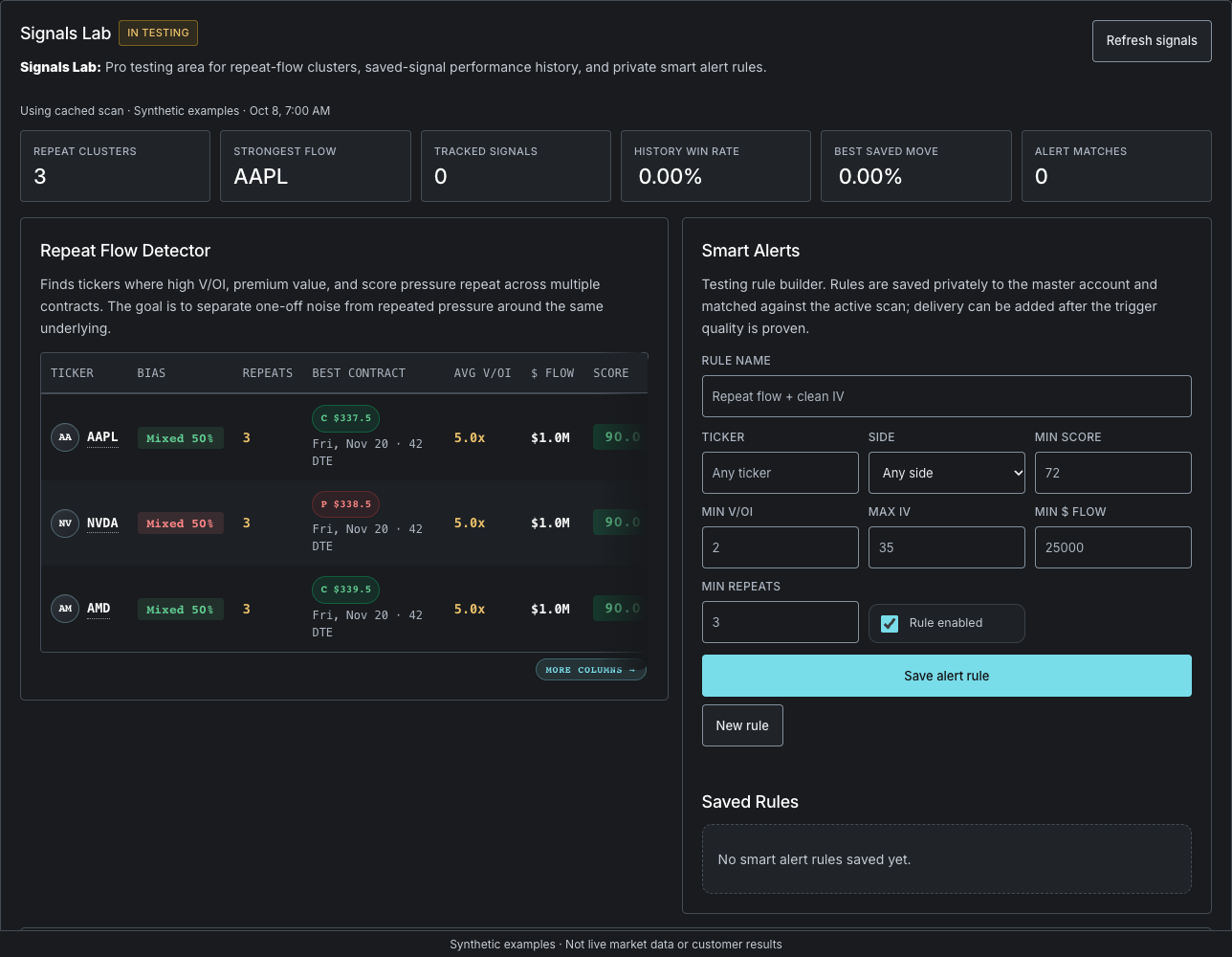
Signals Lab: Pro testing area for repeat-flow clusters, saved-signal performance history, and private smart alert rules.
Signal lab not loaded yet.
↻ Repeat Flow Detector
Finds tickers where high V/OI, premium value, and score pressure repeat across multiple contracts. The goal is to separate one-off noise from repeated pressure around the same underlying.
Ticker
Bias
Repeats
Best Contract
Avg V/OI
$ Flow
Score
Notes
Repeat flow not loaded yet.
RULE Smart Alerts
Testing rule builder. Rules are saved privately to the master account and matched against the active scan; delivery can be added after the trigger quality is proven.
ON Saved Rules
No smart alert rules loaded yet.
HIST Signal Performance History
Uses saved contract snapshots from Favorites to show what happened after a signal was captured. This is the foundation for ranking future alert triggers by outcomes, not just signal appearance.
Contract
Saved
Latest
Option %
Underlying %
Max Option %
Max Drawdown
Score
Snapshots
Status
Signal performance not loaded yet.
MATCH Current Smart Alert Matches
Rule
Ticker
Contract
Exp
Score
IV
V/OI
$ Flow
Repeats
No alert matches loaded yet.
📈 Site traffic
First-party traffic analytics for convexradar.com — requests, page views and daily visitor hashes, plus the most-visited paths and referrers. Visitor uniqueness is derived from a hash of IP, user agent and country; raw IPs and raw user agents are never stored, and this view contains no per-account data.
▲ Daily traffic 30 days
Top paths
Referrers
ConvexRadar / Owner
Understand your audience.
Accounts, activity and billing — with the context behind the numbers.
UTC calendar days · today is partialSnapshot not loaded
Loading snapshot and coverage…
Subscriptions & access
Web billing snapshot · App Store subscriptions are not included. Select a group to view its users.
Acquisition
New tracked records
Dated records added to the directory, grouped by UTC day.
Current snapshot
Audience & measurement
These groups overlap. They are not steps in a conversion funnel.
Definitions & measurement limits
Tracked records
Distinct public email records across accounts, billing and newsletter history. Accounts and newsletter signups overlap. Owner/internal records are excluded by the API.
New records
Uses each merged record’s created_at, which may fall back to a contact or entitlement date. This is not a verified account-signup event. Missing dates are excluded.
Estimated MRR
Active, non-trial billing records at the listed Founder / Pro monthly rates, excluding identifiable manual grants. Legacy grants or discounts may still affect the estimate. Payment settlement is not measured here.
Subscriptions & grants
Stripe-linked subscribers have active, non-trial billing, a recognized Stripe event or sync source, and stored customer/subscription references. Demo and manual grants use explicit billing-source markers; free beta uses its own access flag. Other active records stay unclassified. Counts cover users in the web billing snapshot, not all subscriptions or settled payments.
Conversions & cash
Period conversion and collected cash are unavailable. Subscription linkage is shown separately from payment settlement; this response has no linked acquisition cohort or reconciled payment ledger.
Historical directory · independent of the activity window. “Historic opt-in” combines stored flags and can remain Yes after unsubscribe. Current newsletter permission is shown in Emails.
@ User directory 0 total
Tracked email records. Historical marketing flags are not current newsletter permission.
Directory not loaded yet.
Request activity includes polling, bots and owner traffic. Daily visitor hashes are not people; the same visitor may count again on another day.
Request activity
Daily requests
Top request paths
Counts across the selected recorded days.
Referrers
Recorded request sources; not attributed signups.
Deployment notes
Private deployment notes load after master authentication.
ConvexRadar / Owner
Email operations.
Current permission, latest scheduler status and available send logs.
UTC calendar days · today is partialSnapshot not loaded
Send now uses the existing confirmation and recipient checks.
Logged outcomes by day
Volume by type
Send log
Recorded send outcomes, not inbox delivery or open receipts. Timestamps are UTC.
Available email send logs, UTC timestamps
When (UTC)
Type
Status
Recipient
Detail
Email data not loaded yet.
▣ Socials Studio
Socials: auto-generated post queue (4 slots per market day) with review-before-posting. Copy the caption, download the image, or post directly to X and Facebook once their API keys are configured. TikTok is manual (copy + download). Below the queue: the daily Reddit engagement scanner with drafted replies.
⌕ Engagement radar
Fresh Reddit threads (r/options, r/thetagang, r/Daytrading, r/stocks, r/wallstreetbets) where a genuine answer adds value, each with a drafted value-first reply. Edit before posting — drafts follow the honesty guardrails (disclosure included, no predictions). Scans weekdays ~9:15 AM PT.
Plans & billing
Choose the tools for your research.
Free access includes up to five ranked scan rows with full fields. Founder Beta adds a broader research workflow; Pro adds advanced tools and the P/L journal. Compare the features below before choosing a plan.
Checking plan availability…
Compare plans
Paid plans offer a 5-day free trial for eligible accounts. Review the price and trial terms at checkout. If checkout is unavailable, you can join the beta interest list.
Early-user offer
Pro for the Founder Beta price.
Claim ConvexRadar Pro for $29/mo while this free-account upgrade offer is open. Trial eligibility and terms are confirmed at checkout. Includes P/L journal and Social rooms, plus testing access to Repeat Flow Detector and in-app alert-rule matches. External push delivery is not available.
Trial eligibility confirmed at checkout
Loading
Loading tiers
Checking billing configuration...
Account billing
Sign in to manage billing
Create an account first so billing provider access can be matched back to your ConvexRadar login.
No account session
Feature screenshots
See what each plan unlocks.
Current interface captures with synthetic examples. Founder Beta covers contract research and saved contracts; Pro adds Signals Lab, Community, and the P/L journal. Select any image to inspect it at full size.
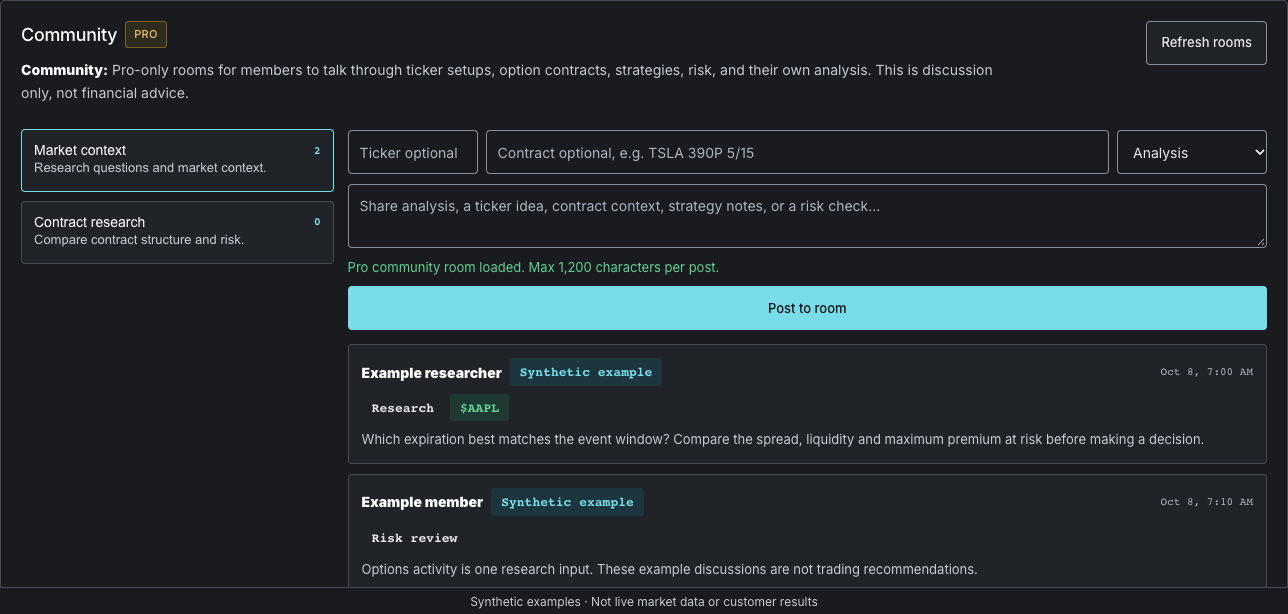
Private Pro-only rooms for ticker, contract, strategy, and risk discussion.
Social HeatPlanned
Public ticker chatter and attention tracking is planned. It is not a currently available Pro feature.
Repeat Flow DetectorIn testing
Group tickers where unusual options pressure repeats across multiple contracts or expirations.
Smart AlertsIn testing
Test private rules against the active scan using score, V/OI, the current-IV proxy, side, ticker, premium, and repeat-flow thresholds. External push delivery is not available.
P/L JournalAvailable
Track realized P/L on a calendar and save review notes for each trading day.
Options Income TrackerAvailable
Log sold and bought contracts with strike, expiry and premium; realized premium counts only once a position resolves.
SOC Community Pro
Community: Pro-only rooms for members to talk through ticker setups, option contracts, strategies, risk, and their own analysis. This is discussion only, not financial advice.
🔔 Alert Rules
Alerts: shows the scanner conditions that should trigger attention, such as high score, squeeze ignition, unusual V/OI, low IV rank, and large estimated premium prints.
High Score Alert (>85)
ACTIVE
Squeeze Fires
ACTIVE
Unusual Volume (V/OI > 3x)
ACTIVE
IV Rank Low (<20)
ACTIVE
Large Block Trade (>$50K)
ACTIVE
Sweep Detected (>$25K)
ACTIVE
Methodology
How the scanner picks contracts
Every contract is filtered, then scored, then a much smaller set is promoted to the header cards. Nothing here is a prediction — it is a ranking of what is worth reading, and the rules are published so you can disagree with them.
01
Filter out what cannot be traded cleanly
Baseline quality rules run before anything is scored. This removes illiquid, far-dated, deep out-of-the-money and wide-spread contracts that can look cheap but are hard to get in and out of.
A base value, then points added or subtracted for chain quality and catalyst context. The weights below are the maximum each input can contribute.
Gamma / $18 ptsConvexity per dollar of premium — more potential movement for the price paid.
Fresh flow16 ptsVolume against open interest. Volume above OI suggests new positioning rather than churn.
Liquidity12 ptsHigher volume, so the contract is actually executable.
IV rankweightedLower implied volatility is rewarded — cheaper vol leaves more room for expansion.
CatalystsadjustsFilings, analyst target changes, insider activity, earnings timing, news sentiment, macro risk and repeat flow can move the final score either way.
03
Promote only the cleanest to the header cards
The top cards run stricter rules than the table below them. They are meant to show clean, directional setups — not everything that passed the scanner.
Threshold
Why it is there
Score ≥ 80
Keeps weak setups out of the header entirely.
IV rank ≤ 35
Prioritises lower-priced volatility.
V/OI ≥ 2×
Requires meaningful fresh demand, not routine volume.
Side bias ≥ 70%
The ticker’s premium bias must match the contract side.
Gamma/$ ≥ 0.002
Keeps genuine convexity in the setup.
$ flow ≥ $15K
Filters out prints too small to mean anything.
Read this before acting on a squeeze
“Squeeze” does not mean the stock must go up. It means the contract carries short-dated convexity pressure: fresh volume against open interest, high gamma per premium, real liquidity and a nearby expiration. Calls can represent upside momentum or upside hedging demand. Puts can represent downside momentum or protective demand. Direction still needs confirmation from chart structure, catalyst and underlying price action — the scanner does not supply it.
Reading the columns
IV Rank
Lower is better by default; the table sorts low IV to the top on load.
C/P
Premium-weighted call/put strength by ticker. C 70% means calls carry most visible premium. Header cards require 70%+ side-aligned bias; the table keeps weaker or mixed reads for review.
V/OI
Intraday option volume divided by open interest. Above 1× suggests fresh activity; above 2× is stronger.
G/P Ratio
Gamma per premium dollar — movement sensitivity for the price paid.
Inferred from chain data, not exchange tape. Sweep, block and split are derived labels. ConvexRadar does not license a consolidated options tape.
What feeds the scan
Option chains
Live chains and quotes power the scanner when connected.
Regulatory filings
Latest 8-K, Form 4, 13F, S-1 and 10-Q/10-K catalyst filings.
Company context
Analyst targets, recommendation trends, insider transactions, earnings surprises and company news.
Earnings
Feeds the earnings calendar and the catalyst timing on each row.
Behaviour worth knowing
US focus
US stocks and ETFs by default. The mixed view caps ETF density so ETFs cannot crowd out single names.
Filters persist
Calls, puts, DTE, sector, market, ticker search and sort survive a refresh.
Hard refresh
Forces fresh data calls instead of relying on browser cache.
Noise labels
Prime, Clean, Watch and Noisy tags say whether a row is actually tradeable.
ConvexRadar is research software. These rules describe how contracts are ranked for review — they are not a prediction of direction and not a recommendation to trade. Options trading involves risk, including total loss of premium.
ChartInteractive Chart
Chart
Contract card
Option setup
Scanner-style contract detail.
Use the ticker text itself for chart provider.
New update
Chart drawing tools and saved workflows are live.
The scanner now gives signed-in users more control over chart review, saved contracts, and table layout.
Draw inside charts. Open a ticker chart and use the chart toolbar to mark trendlines, levels, and setup notes.
Favorites are now public. Signed-in users can star contracts and track saved setups over time.
Scanner columns can be dragged. Reorder table headers and the layout saves on this device.